
Tutorial: Homer AI Chat for TouchdownPredict CFB
Everything TouchdownPredict CFB knows, one question away. Homer AI Chat answers about this week's slate, any school, the Game Board, market prices, live games, team strength, standings and the season outlook. Not sure where something lives on the site? Ask that too. This walkthrough covers how to open the chat, how to ask, and what it is (and is not).
What's covered
What Homer AI Chat is
Opening the chat: suggestions, expand and the microphone
The week's slate, by conference or school
The Game Board: model versus market
Prices, line moves and betslips
Parlays and the Boost Finder
Live games
Team strength, standings and the season outlook
Finding your way around
The question-mark menu: what Homer AI can do
What Homer AI Chat is
Homer AI Chat is a chat window built into TouchdownPredict CFB. Type a question in plain English and it answers from the site's own data for the week: the Game Board, market prices, the live tracker, team ratings, standings and the season outlook. If a feature is on the site, you can usually ask about it here.
College football here is a game-level product, so there are no player projections or player props to ask about. Homer AI describes the model's numbers and the market's; it does not make picks from the model or recommend a side, and it does not report a betting record. It answers from stored data only: the week on the board, today's games for live questions, and the latest week the season was projected for the season outlook.
Opening the chat
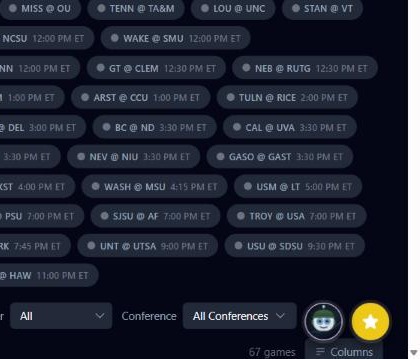
On every TouchdownPredict CFB page there is a round purple Homer AI button in the lower right corner, beside the Starred Plays tray. The button appears for subscribers. Click it to open the chat. It opens as a window in the corner of the screen, or as a sheet on a phone, and the conversation stays put when you close it or move to another page.
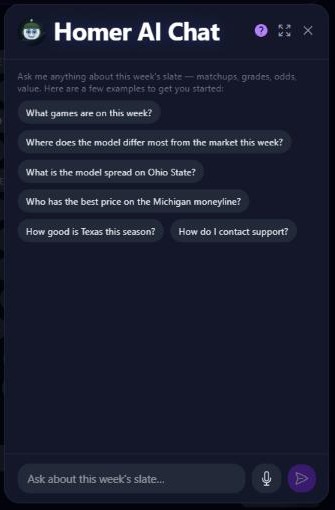
A new chat offers suggested questions such as "What games are on this week?", "Where does the model differ most from the market this week?" and "How good is Texas this season?". Tap one to send it, type your own, or use the microphone button to dictate on browsers and devices that support it.
Along the top are a question-mark button that lists what Homer AI can do, an expand button for a larger window, and a close button. Once a conversation is under way, a New Chat button starts over.
The week's slate
Ask what games are on: matchups, kickoff times in ET, AP ranks, conference and neutral-site games, and the score once a game has started. The college slate is a week, so "this week" and "Saturday" both mean the week the board is showing; ask about tonight's or today's game and only games played today come back. Name a conference, such as "the SEC games" or "Big Ten scores", and the slate, board and prices narrow to the games its schools play in.
The Game Board
Ask for the model's spread and total for any game, beside the market's, with the difference between them. Ask for each team's win probability from the model next to the market's, and which team the model gives a better chance than the market does. Ask about the week as a whole and the games come back gap-first, where the model's number and the market's differ most. That is a description of the week, not a ranking of bets.
"What is the model spread on Ohio State?"
"Where does the model differ most from the market this week?"
"Which game has the biggest difference on the total?"
Prices, line moves and betslips
Ask for book-by-book prices on the spread, total and moneyline, and on first-half lines and team totals when you ask for them, so you can see which sportsbook has the best of it. Ask how far the best price sits from the market's margin-free odds. Ask for the week's biggest line moves since the open, with the opening and current line, the size and direction of the move, and whether the sharp books led.
"Who has the best price on the Michigan moneyline?"
"What are the biggest line moves this week?"
Name one bet or several, such as "put Ohio State -7.5 and the over in a betslip", and Homer AI hands you an openable betslip, with every game and line checked against what the books are posting.
Parlays and the Boost Finder
Ask for parlays from this week's moneylines, spreads and totals, each leg priced at the market's margin-free price, with the parlay's best price, its chance of hitting and the book to place it at. Ask for a parlay at one sportsbook, or under a sportsbook boost, or name the legs you have and see what else pairs with them. For single bets, tell Homer your profit boost or bonus bet and get the plays it is worth the most on, with the hedge that locks the profit in. Ask how your saved parlays are doing, with each leg marked cashed, lost or still to play.
Live games
Ask for today's games from the Game Tracker, FBS and FCS: the live score, quarter and clock, down and distance, where the ball is and each team's timeouts left. Name a school for its game and get the score by quarter, the last play, the drive in progress and the scoring plays in order.
Team strength, standings and the season outlook
Team strength: ratings for any rated school, including adjusted points scored and allowed and how many games a rating is built on, so an early-season number is read for what it is.
Standings: a school's record entering the week, overall, in conference, at home and on the road, plus its streak and AP rank. Ask who is still unbeaten.
Season outlook: a team's projected wins and the chance of each win total, plus chances of bowl eligibility, reaching the conference title game, winning the conference and making the playoff, and strength of schedule played and to come.
Finding your way around
Ask "Where is the game board?" and Homer AI replies with a link to the right page. If something on the site or your account is broken, describe the problem and Homer AI sends it to the support team, with the reply going to your account email. Ask about the NFL and Homer AI hands you over to TouchdownPredict.
The question-mark menu
The question-mark button opens a list of everything Homer AI can do, grouped by topic, with a Good to know section at the bottom. It is the quickest way to see the full range when you are not sure what to ask.
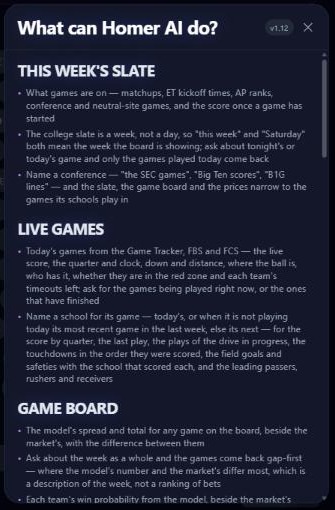
Daily usage limits apply to keep the service fast for everyone.
Open the feature: Homer AI (the chat launcher lives on every TouchdownPredict CFB page)
Must be 21 or older. Please play responsibly.