
Tutorial: Homer AI Chat for TouchdownPredict
Everything on the TouchdownPredict site, one question away. Homer AI Chat answers about this week's slate, a single player, the touchdown boards, the market, the weather, live games and even your own custom tags. Not sure where something lives? Ask that too. This walkthrough covers how to open the chat, how to ask, and what it is (and is not).
What's covered
What Homer AI Chat is
Opening the chat: suggestions, expand and the microphone
The everyday asks: boards, players and games
Narrowing a question to a game, a day or a kickoff window
Market and value questions
Live games and weather
Betslips and parlays
Your tags, DFS and fantasy start/sit
Finding your way around
The question-mark menu: what Homer AI can do
What Homer AI Chat is
Homer AI Chat is a chat window built into TouchdownPredict. You type a question in plain English, and it answers from the site's own data for the week: the boards, the game cheat sheets, the market prices, the live trackers and the weather. If a feature is on the site, there is a good chance you can ask about it here.
It describes what the boards and the market show. It does not give betting advice or guarantees, and it answers only from the stored data for the week on the slate, plus a player's season so far.
Opening the chat
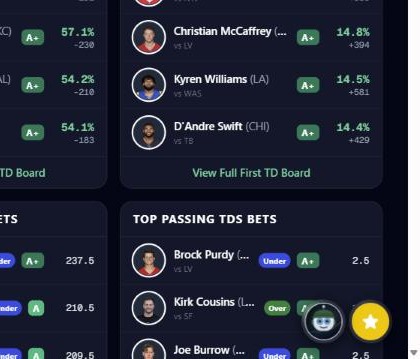
On every TouchdownPredict page there is a round purple Homer AI button in the lower right corner, beside the Starred Plays tray. The button appears for subscribers. Click it to open the chat. It opens as a window in the corner of the screen; on a phone it opens as a sheet. The conversation stays put when you close the window or move to another page.
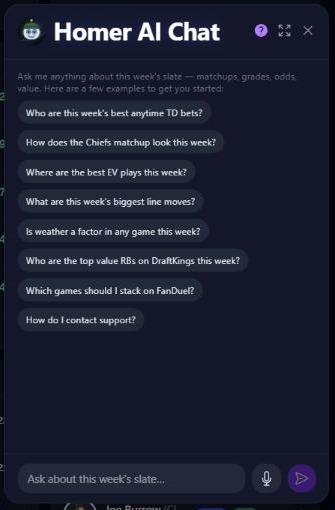
A new chat opens with a few suggested questions, such as "Who are this week's best anytime TD bets?" and "Is weather a factor in any game this week?". Tap one to send it. You can also type your own, or tap the microphone button to dictate it on browsers and devices that support voice input.
Along the top of the window are three controls: a question-mark button that lists what Homer AI can do, an expand button that opens the chat in a larger window, and a close button. Once a conversation is under way, a New Chat button starts over.
The everyday asks
Boards and projections
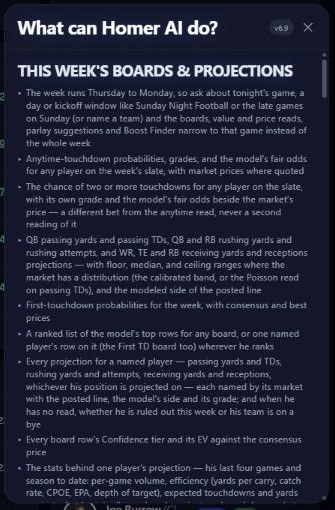
Ask for anytime touchdown probabilities and grades for any player on the slate, the chance of two or more touchdowns, first touchdown odds, or a ranked list of the top rows on any board. You can also ask for a single named player's row, wherever he ranks.
"Who are this week's best anytime TD bets?"
"What are Christian McCaffrey's projections this week?"
"Who has the best chance at a first touchdown?"
Projections cover passing, rushing and receiving yards, receptions, rushing attempts and passing touchdowns, with floor, median and ceiling ranges where they exist.
One player
Ask for the stats behind a player's projection, his week-by-week season so far, how often he has gone over a line, or his live stat line while his game is on. Ask for the Trends board to see who has cleared a line most often over recent games.
Game cheat sheets
Ask about one game and get its market lines, the total, which side is favored, who gets the ball on each team, the injury picture and how each offense lines up against the defense it faces. The Homer AI writeup for the game is available too.
Narrowing a question to a game, a day or a kickoff window
The football slate is a week, running Thursday to Monday, so you can say what part of it you mean. Ask about tonight's game, Sunday Night Football, the late games on Sunday, or name a team, and the boards, prices, parlay suggestions and Boost Finder reads narrow to that game instead of the whole week.
"What are the best anytime TD plays in the Sunday night game?"
"How does the Chiefs matchup look this week?"
Market and value questions
Homer AI can read the market tools for you:
EV Opportunities for a prop market, with the best price and the book offering it
Sharp Opportunities and the records behind them
Soft opening lines and the week's biggest price moves
Odds Comparison, with every book's price side by side for a player
The Boost Finder: tell Homer your sportsbook boost, like a 50% profit boost at a given book, and it returns the plays that boost converts best
Game-bet value reads for moneylines, spreads and totals
Try "Where are the best EV plays this week?" or "What are this week's biggest line moves?".
Live games and weather
During games, ask for a game's live state (score, clock, down and distance, where the ball is), the touchdowns in the order they were scored, who scored first, or a player's live stat line beside his posted lines. For the week ahead, ask about kickoff-window weather and which game the weather may affect most.
Betslips and parlays
Ask for a model-built parlay, such as a three-leg parlay or an anytime TD parlay. Homer AI returns suggested parlays with each leg's chance, grade and odds, plus the combined odds. You can name the legs you already have and ask what pairs with them. Say "put those in a betslip" and Homer AI hands you an openable betslip, with every leg checked against what the books are posting.
Your tags, DFS and fantasy start/sit
Your custom tags: ask which players match your saved tags this week, or why a player carries one.
DFS: ask for the DraftKings or FanDuel slate analysis, a game's DFS breakdown, the top plays at any position, or the stacks to build in a game.
Fantasy start/sit: ask "should I start Bijan Robinson or Jahmyr Gibbs?" and say whether your league is standard, half-PPR or PPR.
Survivor pools: ask for this week's survivor read, the safest pick, or where the public is projected to land.
Finding your way around
Ask "Where can I find the touchdown model?" and Homer AI replies with a link to the right page. If something on the site or your account is broken, describe the problem and Homer AI sends it to the support team, with the reply going to your account email. If you ask about baseball, Homer AI hands you over to HomerunPredict.
The question-mark menu
The question-mark button at the top of the chat opens a list of everything Homer AI can do, grouped by topic, with a Good to know section at the bottom. It is the quickest way to see the full range when you are not sure what to ask.
Daily usage limits apply to keep the service fast for everyone.
Open the feature: Homer AI (the chat launcher lives on every TouchdownPredict page)
Must be 21 or older. Please play responsibly.