
Tutorial: Goal Scorer Model Board
The Goal Scorer Model is the flagship board in PuckPredict: every skater on tonight's slate with a goal probability, a grade and the market's price beside it. This walkthrough explains each column, how to scope the slate and filter it, what the tiers mean, and how the Stats view and the player modal fit in, so the board reads like a story instead of a spreadsheet.
What's covered
What the Goal Scorer Model is
Getting there and choosing the date
Narrowing the slate with game chips
Reading a row: grade, goal probability and tier
The market columns: consensus odds, best book and the two EVs
Filters, tags and columns
The Stats view and its window
The other tabs: 2+ Goals, 3+ Goals and First Goal
The skater modal, tab by tab
What the Goal Scorer Model is
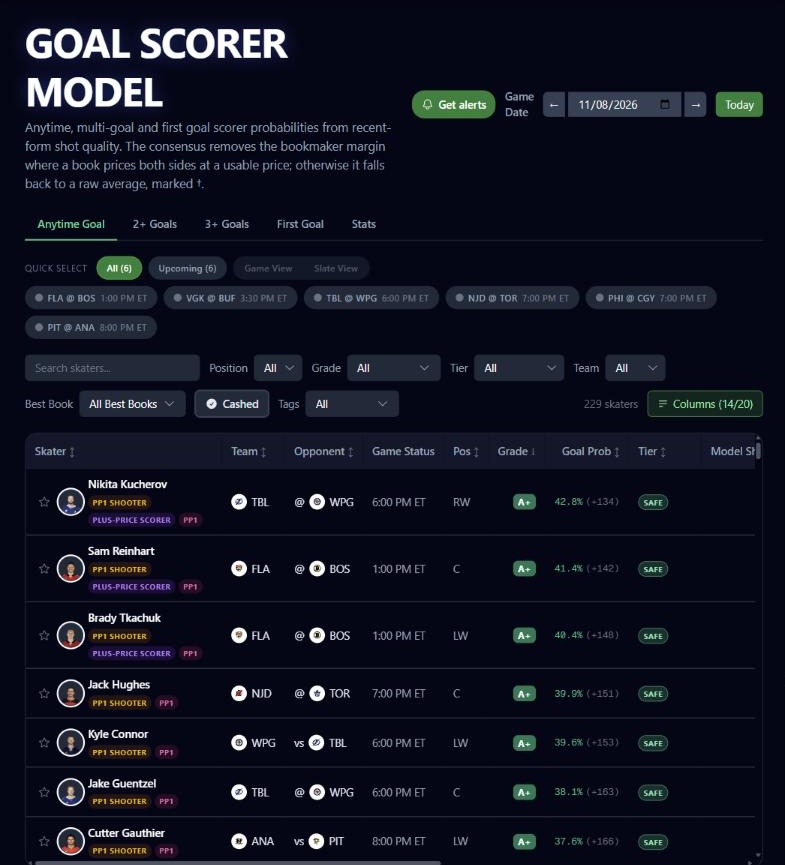
The page opens on the Anytime Goal tab: one row per skater in tonight's games, answering how likely that skater is to score a goal. The other tabs are separate bets with boards of their own: 2+ Goals, 3+ Goals and First Goal. A fifth tab, Stats, shows the raw numbers behind the same skaters.
The board opens sorted by grade, best first, with goal probability ordering skaters inside a grade.
Getting there and choosing the date
Open the sidebar and choose Goal Scorer Model under Player Tools. The hockey slate is a night of games, so the control in the top right is a date selector: step back or forward a day, or jump to today. The date stays in place as you move between tabs. A Get alerts button sits beside it; it turns on goal alerts for the skaters you have starred.
The page subtitle carries a standing note about the consensus price: it removes the bookmaker margin where a book prices both sides at a usable price, and otherwise falls back to a raw average, marked with a dagger.
Narrowing the slate with game chips
Above the table is one chip per game on the date. Click a chip to show only that game, click several to compare, or click All to clear. Finished games fold into a single Final chip. Once games are selected, a Game View and Slate View toggle lets you choose between a table split by game and one flat table across the selected games.
Reading a row
The Skater cell
The first column holds a star, a headshot and the skater's name. Click the name to open the skater modal. A G badge appears once the skater has scored in the game. Any of your custom tags that match the skater sit on their own line under the name.
Team, Opponent, Game Status and Pos
Team and Opponent show logos, with "vs" for a home game and "@" for a road game. Game Status shows the start time and, later, where the game stands. Pos shows the skater's position. Finished games are pinned to the bottom and dimmed so a game that is over never leads the board.
Grade, Goal Prob and Tier
Grade is the letter for the play, from A+ down.
Goal Prob is the chance the skater scores, tinted to match the grade, with the equivalent American price alongside it.
Tier is a pill reading SAFE, BALANCED or CEILING. It describes the price range of the best posted price: SAFE up to +400, BALANCED up to +700 and CEILING above. A tier describes the price of the bet, not how confident the board is.
Two more per-game columns sit between Tier and the market columns: Model ShotQ/G and Model SOG/G, which show recent-form rates for shot quality and shots on goal.
The market columns
Consensus Odds is the market's consensus price for the skater to score. A dagger marks a price that is a raw average rather than a margin-free one.
Best Book is the longest bettable price across books, with the sportsbook offering it.
Model EV is expected value of the board's probability at that best price.
De-Vig EV is expected value of the fair consensus at that best price. It needs both a fair consensus and a bettable price, so it is blank when either is missing.
Filters, tags and columns
The toolbar narrows the board; on a phone it collapses behind a Filters button.
Search skaters finds a skater by name.
Position offers All, F (forwards) and D (defensemen).
Grade picks one or several letters.
Tier offers All, SAFE, BALANCED and CEILING.
Team narrows to one team.
Best Book narrows to rows where a chosen sportsbook has the best price.
Cashed shows only skaters who have already scored in the game.
Tags filters to skaters who match your custom tags. It appears when you have tags.
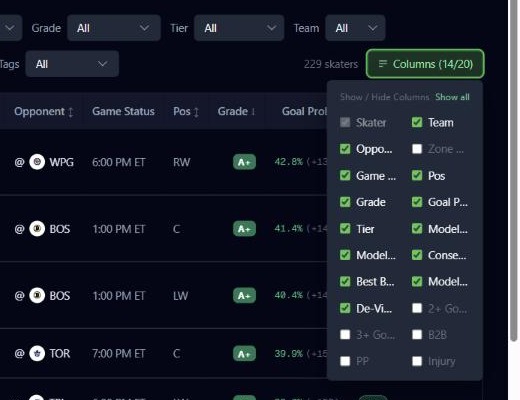
A Clear control resets the filters, and a count shows how many skaters are on screen. The Columns menu shows and hides columns. Several are off until you turn them on, including 2+ Goals and 3+ Goals probabilities, B2B (the team played yesterday), PP (the skater's projected power-play unit), Injury (the lineup sheet designation) and Zone Matchup.
The Stats view
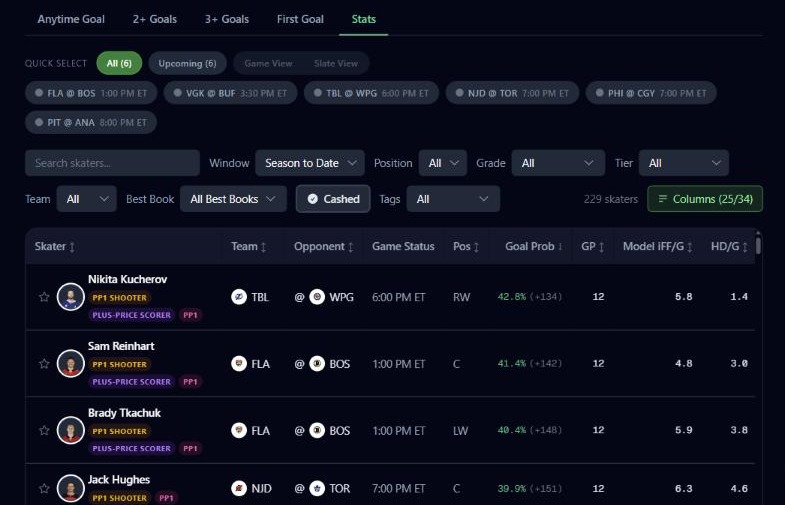
Click the Stats tab to see the raw numbers behind the same skaters, with the same game chips and filters. A Window selector appears so you can read the numbers over the last 5, 10 or 12 games, or the season to date. Columns include games played in the window, goals, shots on goal, shooting percentage, shot attempts, high-danger attempts, time on ice and power-play time on ice, and recent goal and point streaks. Early in a season, a window can reach back into last season, and each value is marked with how many of its games are from last season.
The other tabs
2+ Goals, 3+ Goals and First Goal each have a board built the same way, with their own probability column (2+ Goals Prob, 3+ Goals Prob and First Goal Prob), grade, consensus price, best book and EVs.
The skater modal
Click a skater's name to open the modal on the board's game and market. Its tabs are:
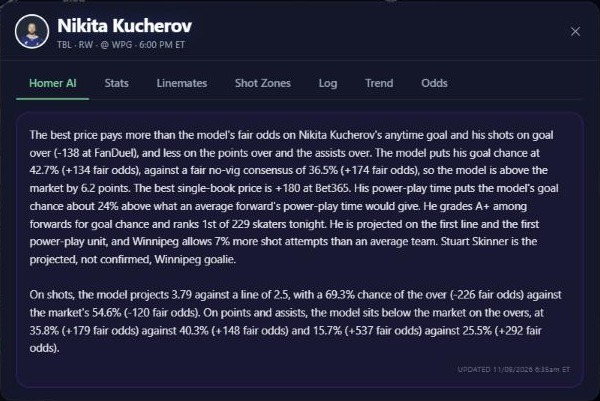
Homer AI: the written read for the skater's game, when one is available.
Stats: the skater's numbers.
Linemates: who he skates with and how those combinations have done.
Shot Zones: where he shoots from.
Log: his recent games.
Trend: how he has done against the line.
Odds: every sportsbook's price side by side.
Goalies get their own Game Log, Splits and Starts tabs.
Open the feature: Goal Scorer Model
Must be 21 or older. Please play responsibly.