
Tutorial: Game Board
The Game Board is the flagship page of TouchdownPredict CFB: one row per game of the week, with the model's spread, total and win probability set beside the market's consensus lines and best available prices. This walkthrough shows how to choose a week, what each column means, how the gap highlighting works, how to filter the slate, and what is inside the game detail modal.
What's covered
What the Game Board is
Getting there and choosing the week
The Homer AI Week Overview and the gap strip
Reading a row: matchup, kickoff and status
Spread, total and win probability: model versus market
Opening lines and best prices
Filters and columns
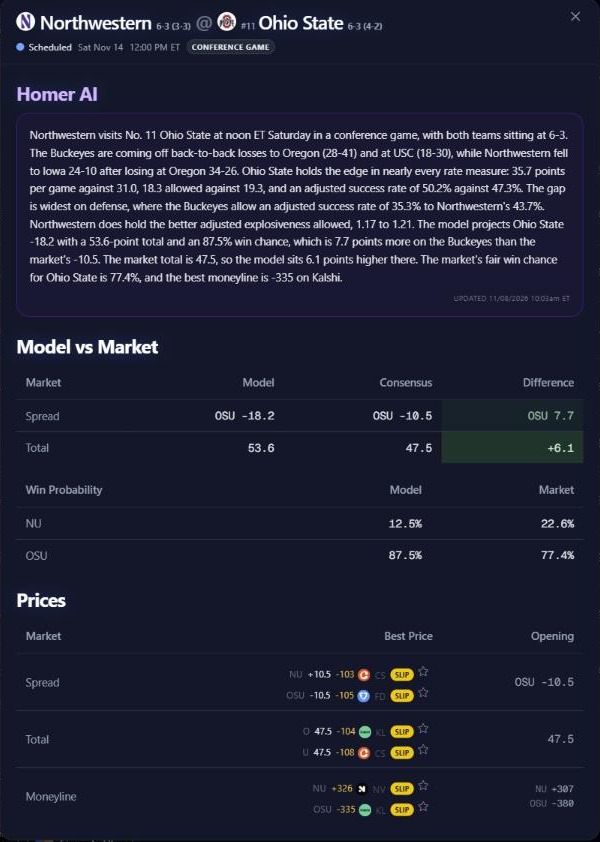
The game detail modal
What the Game Board is
College football is a game-level product on TouchdownPredict CFB: the board shows the model's view of each game, not player projections. For every game it lays out three things side by side: the model's spread, total and win probabilities; the market's consensus for the same three; and the best prices available at sportsbooks. The board is a description of where the model and the market agree and differ. It does not tell you which side to take.
Getting there and choosing the week
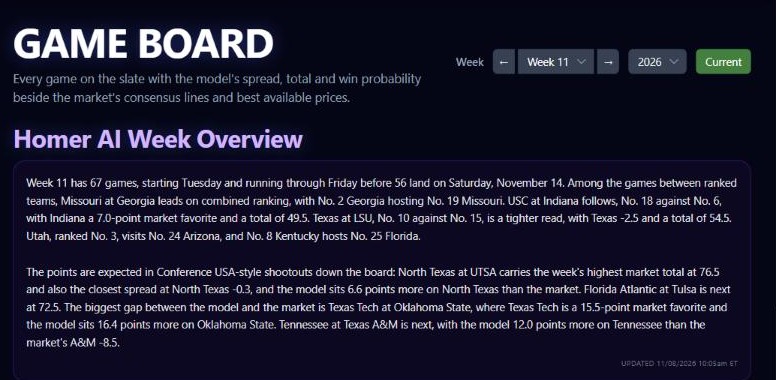
Open the sidebar and choose Game Board. The page opens on the current week of the schedule. A college week runs Tuesday to Monday, so each row shows the day as well as the time of kickoff. Use the week selector in the top right to step to other weeks of the season.
The Homer AI Week Overview and the gap strip
When one is available, a Homer AI Week Overview sits above the table with a written read of the week.
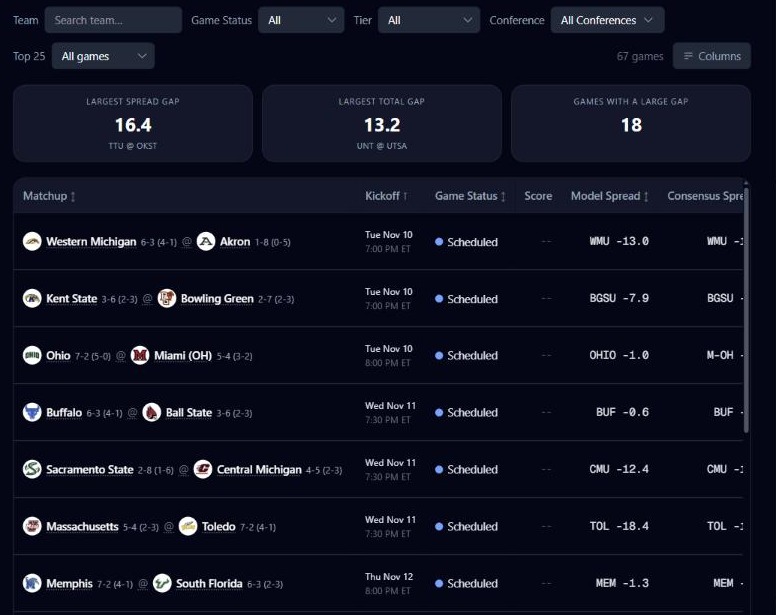
Below the filters is a strip of three tiles:
Largest Spread Gap: the biggest difference between the model's spread and the market's on the games on screen, with the matchup that holds it.
Largest Total Gap: the same for totals.
Games With a Large Gap: how many games are far apart on either.
The tiles follow your filters, so narrowing the board narrows the tiles.
Reading a row
Matchup, Kickoff, Game Status and Score
The Matchup column shows each team with its logo, AP rank and record, as "away @ home", or "vs" with a Neutral Site badge at a neutral venue. Click the matchup to open the game detail modal. Kickoff shows the day and time, Game Status shows where the game stands, and Score shows the running or final score once there is one.
Games against non-FBS opponents are dimmed, listed for the schedule only and pinned to the bottom, with no projection or betting lines. A note under the table says so.
Spread, total and win probability
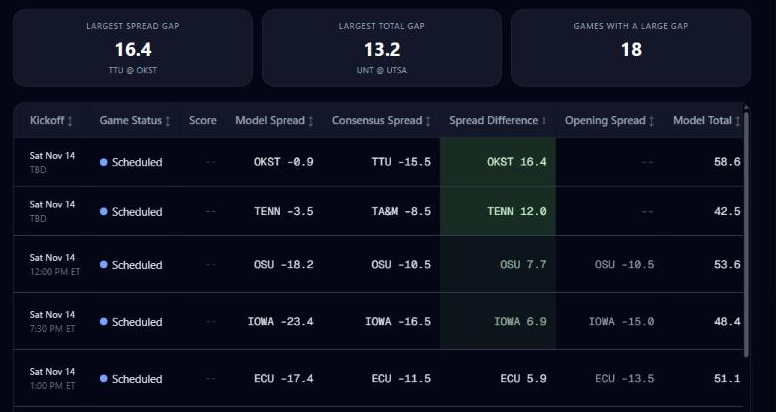
Model Spread and Consensus Spread name a team and a handicap, so you can compare the model's number with the market's directly.
Spread Difference names the team the model favors more than the market does and by how many points.
Model Total, Consensus Total and Total Difference do the same for the game's total points.
Model Win Probability and Market Win Probability list each team's chance in the game, one team per line. The market column is blank when the books do not price both sides.
Win Probability Difference names the team the model likes more than the market does and by how many percentage points.
The three Difference columns are tinted green when a gap is large, in two steps, with the deepest shade for the largest gaps. Click a Difference header to sort the week by the size of the gap, regardless of direction. The tint marks distance between model and market. It is not a pick.
Opening lines and best prices
Opening Spread and Opening Total show where the market opened, so you can see how far a line has moved. The Best Spread, Best Total and Best Moneyline columns show the best available price on each side, with the sportsbook offering it and the line that price is offered at. Where a bet is available, a Slip button adds it to a betslip and a star saves it to your Starred Plays tray.
Filters and columns
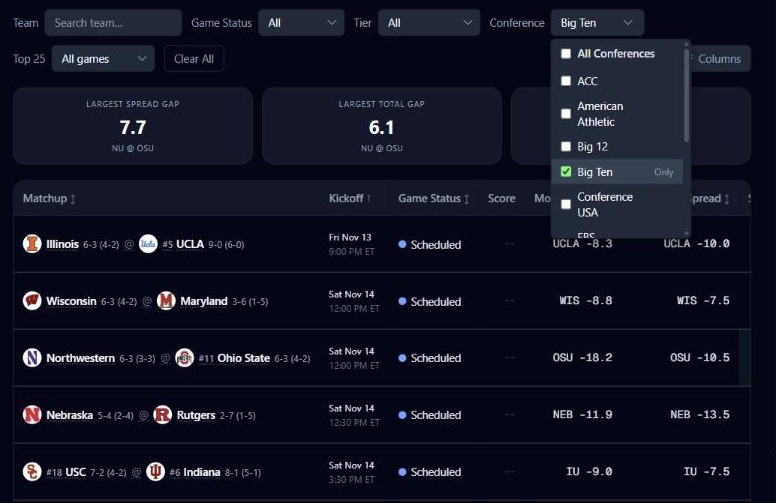
The toolbar narrows the week; on a phone it collapses behind a Filters button. Above it, game chips let you pick individual games.
Team search finds a team by name.
Game Status offers All, Upcoming, Live, Started and Final.
Tier offers All, Power 4, Group of 5 and Independents.
Conference picks one or several conferences.
Top 25 offers All games or Top 25 games.
A Clear control resets the filters, and a count shows how many games are on screen. The Columns menu shows and hides any column. Your status, tier, conference and Top 25 choices and your column choices are remembered for next time; the team search and game chips are not. The board opens sorted by kickoff, earliest first, and any sortable header re-sorts it.
The game detail modal
Click a matchup to open the detail modal. It shows the teams, the status and score, kickoff, and a Neutral Site or conference-game marker, and then three sections:
Homer AI: the written read for the game, when one is available.
Model vs Market: a table of Spread and Total with the model, consensus and difference, and a win probability table with the model's and the market's chance for each team.
Prices: the best price on the spread, total and moneyline, beside where each opened.
Open the feature: Game Board
Must be 21 or older. Please play responsibly.